

Marketing teams are no longer choosing between static images and video as if they were competing formats. More often, they’re deciding which tool should handle which part of the job. An AI image generator is useful when a team needs a strong visual starting point. An image-to-video tool becomes useful once that visual needs movement.
That distinction sounds simple, but it changes the production process. A product image, social graphic, or storyboard may be finished after one generation and editing cycle. A short promotional clip usually needs another step: taking a good still and turning it into something that moves without losing the details that made the original useful.
The shift toward this two-step workflow tracks with broader adoption data. In Wyzowl’s 2025 State of Video Marketing survey, 51% of video marketers said they had used AI tools to help create or edit video, and 93% of video marketers reported a positive ROI from video content overall. AI hasn’t replaced the production process; it has changed which steps a team does by hand.
What Is the Difference Between an AI Image Generator and an Image to Video Tool?
An AI image generator creates a still image from instructions such as a text prompt, reference image, or other supported inputs. An image-to-video tool starts with an image and generates a moving sequence from it. Depending on the platform, creators can guide camera movement, subject motion, or other visual changes.
In simple terms, AI image generation answers “What should this look like?” Image-to-video answers “How should this visual move?” For marketing teams, the two workflows tend to work best in sequence: settle the product, composition, lighting, and overall look in a still image first, then animate the approved frame for a social post, product teaser, or short campaign video.
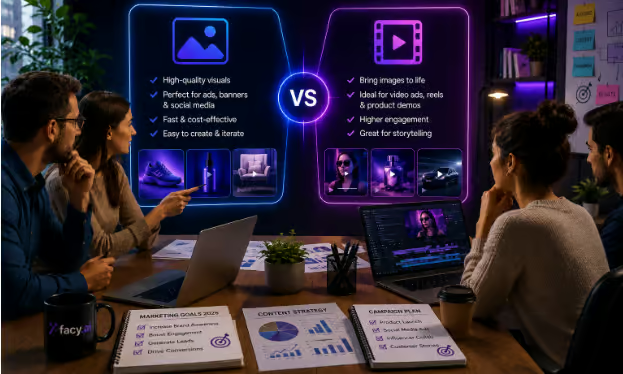
AI Image Generation vs. Image to Video: At a Glance
| Capability | AI Image Generation | AI Image to Video |
| Starting point | Text prompt, reference image, or other supported inputs | A still image, usually with instructions for motion |
| What you get | A finished or editable still visual | A short moving sequence based on the starting visual |
| Common marketing uses | Product visuals, campaign concepts, thumbnails, social graphics, storyboards | Social clips, animated product visuals, promotional posts, short demonstrations |
| What needs attention | Composition, detail, typography, anatomy, and visual consistency | Motion, subject stability, frame-to-frame consistency, and unwanted changes |
Top AI Image Generators for Marketing and Content Creation
There’s no single image generator that’s the obvious choice for every creative brief. The better question is what the team needs from the tool: fast concept exploration, strong aesthetics, editing flexibility, integration with an existing design workflow, or a simple browser-based experience.
- Google Nano Banana Pro: Useful for image workflows that benefit from multimodal input and detailed visual or text control.
- Adobe Firefly: A practical option for teams already using Adobe’s creative tools and wanting generation within that ecosystem.
- Midjourney: A popular choice for visual exploration, mood boards, and concept work where style and creative direction matter.
- Facy: A browser-based AI image generator for teams that want image generation as part of a broader visual-content workflow, without switching
Top Image to Video Tools for Dynamic Marketing Content
Image-to-video tools are most useful when the starting image already works. Instead of asking a model to invent the entire scene and its movement at the same time, the creator can establish the visual first and then focus the prompt on motion.
- Sora 2 and Veo 3.1: Useful for generative video workflows where cinematic movement and scene-level generation are important.
- Runway: A flexible option for creative teams working with generated video and motion-focused workflows.
- Facy: Useful when a team wants to move from a finished still into AI Image to Video within the same browser-based environment used for image generation.
Which Tool Should You Use?
- Use an AI image generator when the final asset is a still image, such as a product visual, social graphic, campaign concept, thumbnail, or storyboard.
- Use image-to-video when you already have a useful visual and need movement, camera motion, or a short animated sequence.
- Use both when you want to control the starting frame before turning it into video. This is often useful when a product, person, or branded visual needs to stay consistent.
A Practical Workflow for Better Results
- Start with the visual. If the campaign depends on a particular product, person, composition, or color treatment, establish those details in a still image first.
- Clean it up. Look for obvious problems before animation. Fixing an awkward hand, distorted product detail, or distracting background is easier before the image becomes a moving sequence.
- Describe the movement. Once the image is ready, focus the video prompt on what should move. A prompt such as “slow camera push-in, hair moving gently in the breeze” gives the model a clearer job than repeating the entire scene description.
- Review the whole clip. A frame can look good while the overall sequence still feels wrong. Check faces, hands, product shapes, lighting, and backgrounds from beginning to end.
Common Problems to Watch For
- Subject morphing. A person, product, or object may subtly change shape when the model struggles to maintain spatial relationships during movement. Reducing unnecessary motion and starting with a clean image can help.
- Flicker. Fine details, textures, or lighting may shift between frames. Always judge the result as a sequence rather than by inspecting only one frame.
- Inherited image problems. If the starting image contains a visual defect, animation can make it more noticeable. Correct the source image before generating motion whenever possible.
FAQ
An AI image generator creates a still visual from a prompt, reference image, or other supported inputs. Teams commonly use these tools for product visuals, social graphics, campaign concepts, thumbnails, and storyboards.
Image-to-video AI takes a starting image and generates a moving sequence from it. Depending on the platform, the creator can guide camera movement, subject motion, or other changes.
Facy AI can be useful for marketing teams and content creators who need browser-based image generation for product visuals, social media content, campaign concepts, and creative variations.
It depends on the asset. AI image generation is usually better for creating static visuals and exploring creative directions, while image-to-video is useful when motion adds value. For some campaigns, using both can provide the most flexibility.
Some platforms offer both capabilities. This can simplify a workflow when a team wants to create a still image and then use that image as the starting point for a video.
It depends on the asset. Image generation is usually the better fit for static content, while image-to-video is useful when motion adds value. For some campaigns, using both provides the most control.
What This Means for Marketers
AI image generation and image-to-video are best treated as complementary tools. One establishes the visual; the other gives that visual movement.
For marketing teams, the most dependable approach is often to get the still image right first and then decide what motion actually improves the story. This makes the creative process easier to review and gives the final asset a clearer purpose.
The goal isn’t simply to generate more content. It’s to create the right visual for the job, then use motion when motion genuinely adds something to the message.